Basic Isolated Staking Setup
Product value proposition
Competitive offering to native staking — users stake with the same Node Operator and get optional liquidity through stETH.
Product characteristics
| Parameter | Value |
|---|---|
| Number of stakers | 1 (Isolated staking setup) |
| stETH minting capability | Yes, on demand |
Building blocks
| Building block | Solution | Implementation |
|---|---|---|
| Basis | stVault | Out-of-the-box |
| User Interface | stVault Web UI | Out-of-the-box |
Economy model and calculator
The stVault strategy - ETH is deposited to validators and generates staking rewards; stETH is minted on demand by the Vault Owner.
For custom calculations, use this spreadsheet as a calculator: Lido stVault Economics Model
Economy calculation example
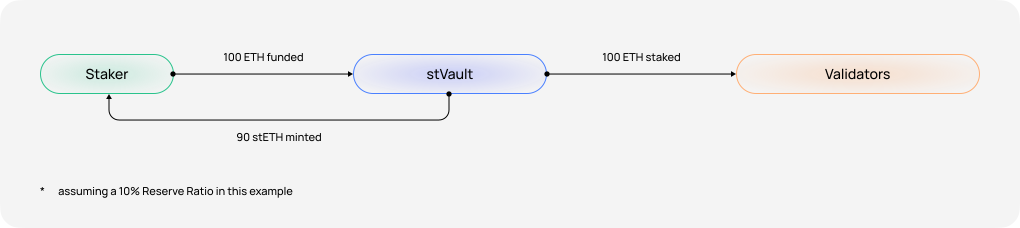
As an example, we consider a personalized staking setup with a single Node Operator, and full utilization of available stETH Minting Capacity.
Annualized Economics Breakdown
Staking Rewards
Validators generate staking rewards on top of the 100 ETH deposited to the Beacon Chain. e.g., 3.2% Staking APR.
Set per stVault through consensus between the Vault Owner and the Node Operator. e.g., 3% out of Gross Staking Rewards earned.
In this example, the annual Lido Fee approximately equals 6% of the Lido Core Gross APR and can be calculated by the equation: Lido Fee = 6% * 3.2% Lido Core Gross APR * 90 stETH = 0.1728 ETH; e.g., Lido Core Gross APR ~ 3.2%.
stETH Liability Growth
The stVault’s liquidity is provided in stETH, a rebasing token — its balance updates daily to reflect accrued staking rewards. To ensure the Vault Owner’s repayment amount is always accurately represented, the minted stETH liability adjusts daily in line with stETH’s rebasing mechanics. This is primarily a technical adjustment, as the liability increase is offset by the rewards the Vault Owner earns as a holder of stETH. e.g., stETH APR ~ 2.88%.
stVault Bottom Line
A positive stVault Efficiency indicates that the Node Operator’s performance is sufficient to cover the growth of the stETH Liability.
stETH Usage Outside the stVault
The Vault Owner generates primary profit via higher validation performance than Lido Core APR plus rewards received as a stETH holder.
- + 0.3392% — stVault Efficiency upside
- + 2.592% — minted stETH APR (normalized to stVault Total Value 100 ETH)
Architecture
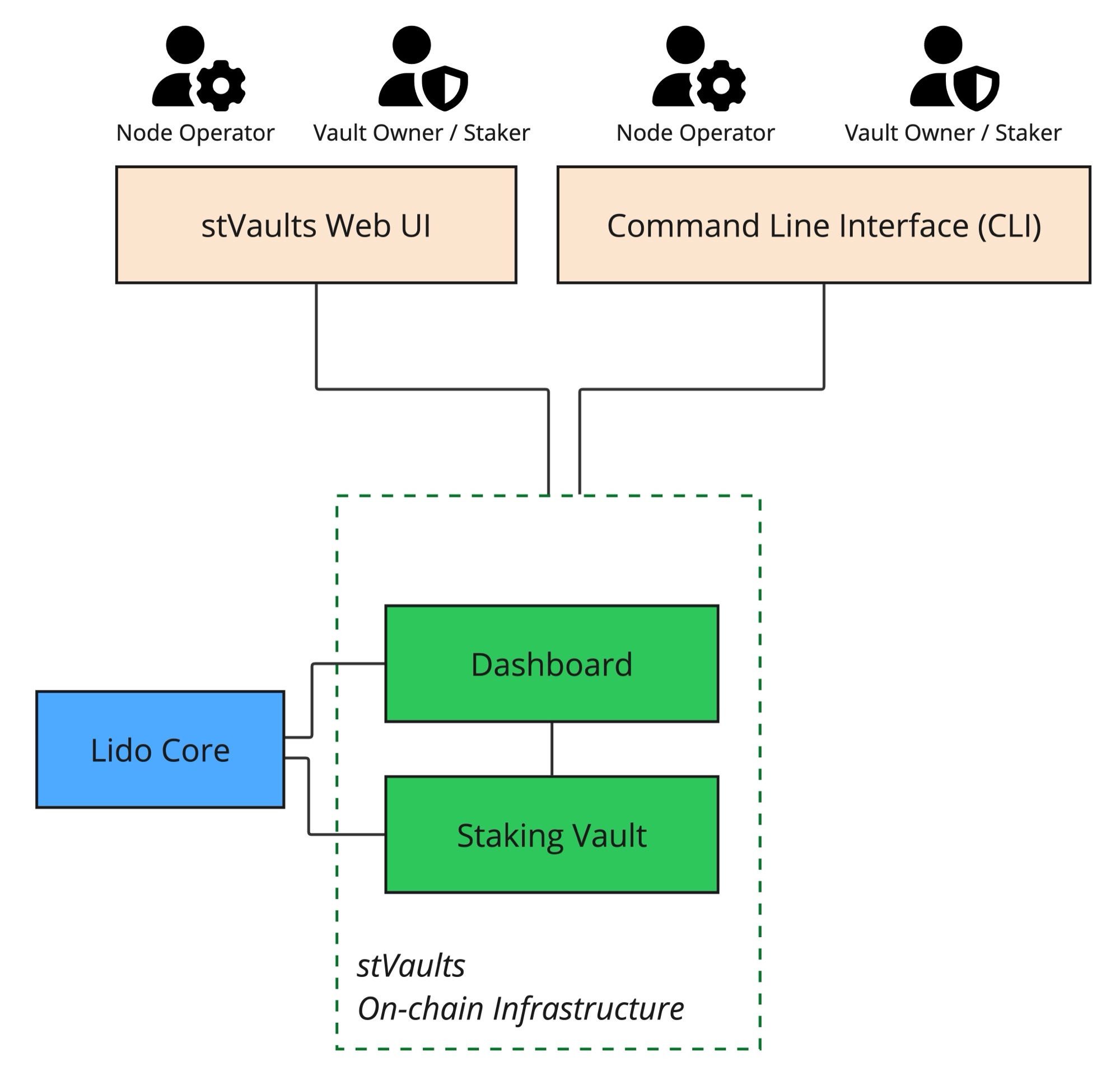
Creating new stVault
➡️ URLs and Smart Contract addresses are listed on Environments
Creating an stVault is permissionless. There are two main ways to do it:
- Two-step process (recommended): initiated by the Node Operator and completed by the Vault Owner.
- One-step process: create stVault and supply 1 ETH of the Connection Deposit in a single transaction.
Parameters needed to create an stVault:
- Node Operator address — a unique, immutable identifier of the Node Operator within stVaults, used in protocol logic such as calculating per-operator stETH minting terms and limits. It designates the Node Operator that provides validation services for the stVault and also manages ETH deposits from the stVault balance to validators, as well as handling validator exits when required.
- Node Operator Manager address. One of the two administrative roles in an stVault. From the Node Operator perspective, this role manages permissions and can update key vault parameters. Multiple addresses are supported.
- Vault Owner address. One of the two administrative roles in an stVault. From the Vault Owner (Staker) perspective, this role manages permissions and can update key vault parameters. Multiple addresses are supported.
- Node Operator Fee. The share of gross staking rewards that the Node Operator charges for providing validation services. Expressed in basis points [0 (0%) .. 10,000 (100%)].
- Confirmation Lifetime. The key parameter of the multi-role confirmation mechanism. It defines the maximum time interval between proposal and confirmation. This mechanism is used to update certain stVault parameters by requiring consensus between the two stVault representatives: the Vault Owner and the Node Operator Manager. Measured in seconds [3,600 sec (1 hour) .. 2,592,000 sec (30 days)]. For security reasons, it is strongly recommended to keep it as short as possible. The CLI applies a stricter floor than the contract: whole hours, and at least 86,400 sec (24 hours) on Mainnet.
1. Two-step process (recommended)
This approach enables a Node Operator to create an stVault without providing their own ETH. It is recommended because it prevents ETH commingling and streamlines the experience for Stakers and Vault Owners.
1.1. Node Operator creates an stVault that is not yet connected to Lido Core.
Creating an stVault is a permissionless operation, but in this two-step process it is usually performed by the Node Operator.
by Command-line Interface
yarn start vo w create-vault create-without-connecting --defaultAdmin <VaultOwnerAddress> --nodeOperator <NodeOperatorAddress> --nodeOperatorManager <NodeOperatorManagerAddress> --confirmExpiry <TimeInSeconds> --nodeOperatorFeeRate <NodeOperatorFeeInBasisPoints> 1
Note down the addresses of the created Vault and Dashboard contracts — these are the key contracts of your newly created stVault.
using Etherscan UI
- Open Etherscan and navigate to the VaultFactory contract — find its address on the Environments page.
- Call
createVaultWithDashboardWithoutConnectingToVaultHub. You can leave_roleAssignments = []. - Sign the transaction in your wallet.
- Click View your transaction and wait for it to be executed.
- Open the Logs tab, scroll to the DashboardCreated event, and note down the addresses of the created StakingVault and Dashboard contracts — these are the key contracts of your newly created stVault.
1.2. When an stVault is created, the Node Operator may optionally propose a tier with more favorable stETH minting terms than the Default tier.
To perform this step, the Node Operator of the newly created vault must already have individual tiers assigned. Otherwise, the stVault will remain limited to the Default tier option (tierID = 0).
Parameters needed for this step:
VaultAddress: the address of theVaultcontract.TierID: the ID of the tier to which the stVault will be connected.RequestedShareLimit: the requested absolute stETH minting limit for the stVault, expressed in shares. This value cannot exceed the tier’s stETH limit. Learn more about shares and stETH / wstETH tokens.
by Command-line Interface
yarn start contracts operator-grid w ct <VaultAddress> <TierID> <RequestedShareLimit>
using Etherscan UI
- Open Etherscan and navigate to the OperatorGrid contract — find its address on the Environments page.
- Call
changeTier.
1.3. After that, the Vault Owner, in one transaction, accepts the stETH minting parameters and fees (by accepting the tier), supplies 1 ETH as the Connection Deposit for the VaultHub connection, and initiates the connection to VaultHub.
The 1 ETH Connection Deposit becomes part of the stVault Total Value, can be used as collateral for minting stETH, and can be deposited to validators to earn validation rewards. It can be withdrawn after disconnecting the stVault from VaultHub.
This is a permissioned operation. By default, this permission belongs to the Vault Owner, who can delegate it to other addresses (multiple supported, including the Vault Owner’s own address). Read more about roles.
Parameters and addresses needed for this step:
VaultAddress: the address of theVaultcontract.TierID: the ID of the tier to which the stVault will be connected.RequestedShareLimit: the requested absolute stETH minting limit for the stVault, expressed in shares. This value cannot exceed the tier’s stETH limit. Learn more about shares and stETH / wstETH tokens.payableAmount: the amount of ETH to supply in the same transaction; minimum is 1 ETH.
using stVaults Web UI
-
Open the stVaults Web UI (see Environments)
-
Connect wallet on the "My Vaults" page.
-
Open an stVault overview page at
https://<domain>/vaults/<StakingVaultAddress>
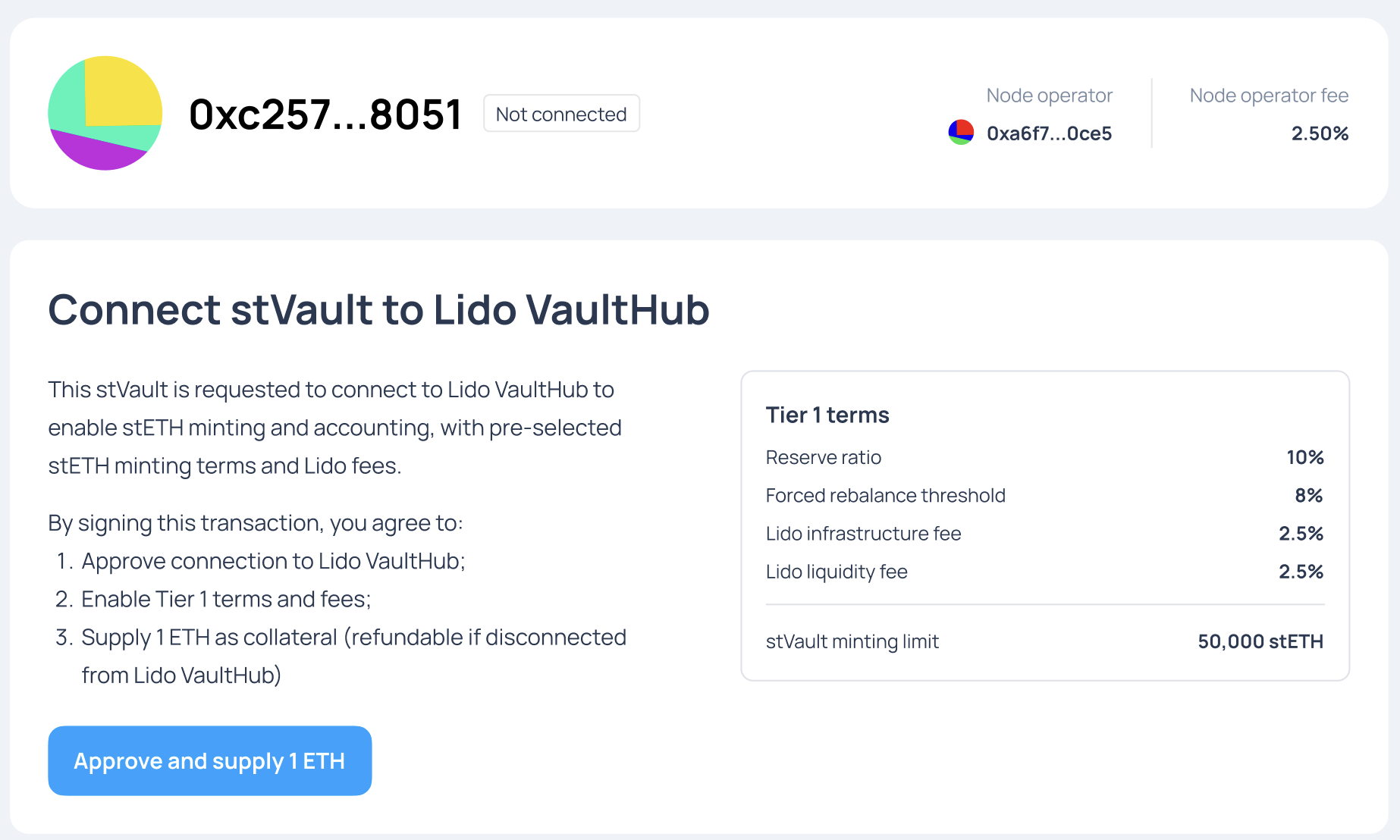
-
Review parameters and click "Approve and supply 1 ETH".
-
Sign transaction in the wallet.
by Command-line Interface
yarn start contracts dashboard w connect-and-accept-tier -f <DashboardAddress> <TierID> <RequestedShareLimit>
using Etherscan UI
- Open Etherscan and navigate to the Dashboard contract — find its address on the Per-setup addresses page.
- Call
connectAndAcceptTier:- fill out the
payableAmountfield with '1' to supply1 ETHin the same transaction; - set
_tierIdto the tier to connect to —0is the Default tier; - set
_requestedShareLimitto the stETH share limit you want for the stVault.
- fill out the
2. One-step process
In this approach, the Vault Owner creates an stVault that is automatically connected to Lido Core, enabling stETH minting. This requires supplying 1 ETH, which is locked as the Connection Deposit for the VaultHub connection. The entire process is completed in a single transaction. While stVault creation is permissionless, this approach is typically performed by the intended Vault Owner of the new stVault.
The 1 ETH Connection Deposit becomes part of the stVault Total Value, can be used as collateral for minting stETH, and can be deposited to validators to earn validation rewards. It can be withdrawn after disconnecting the stVault from VaultHub.
using stVaults Web UI
- Open the stVaults Web UI (see Environments)
- Connect wallet on the "My Vaults" page.
- Click "Create vault".
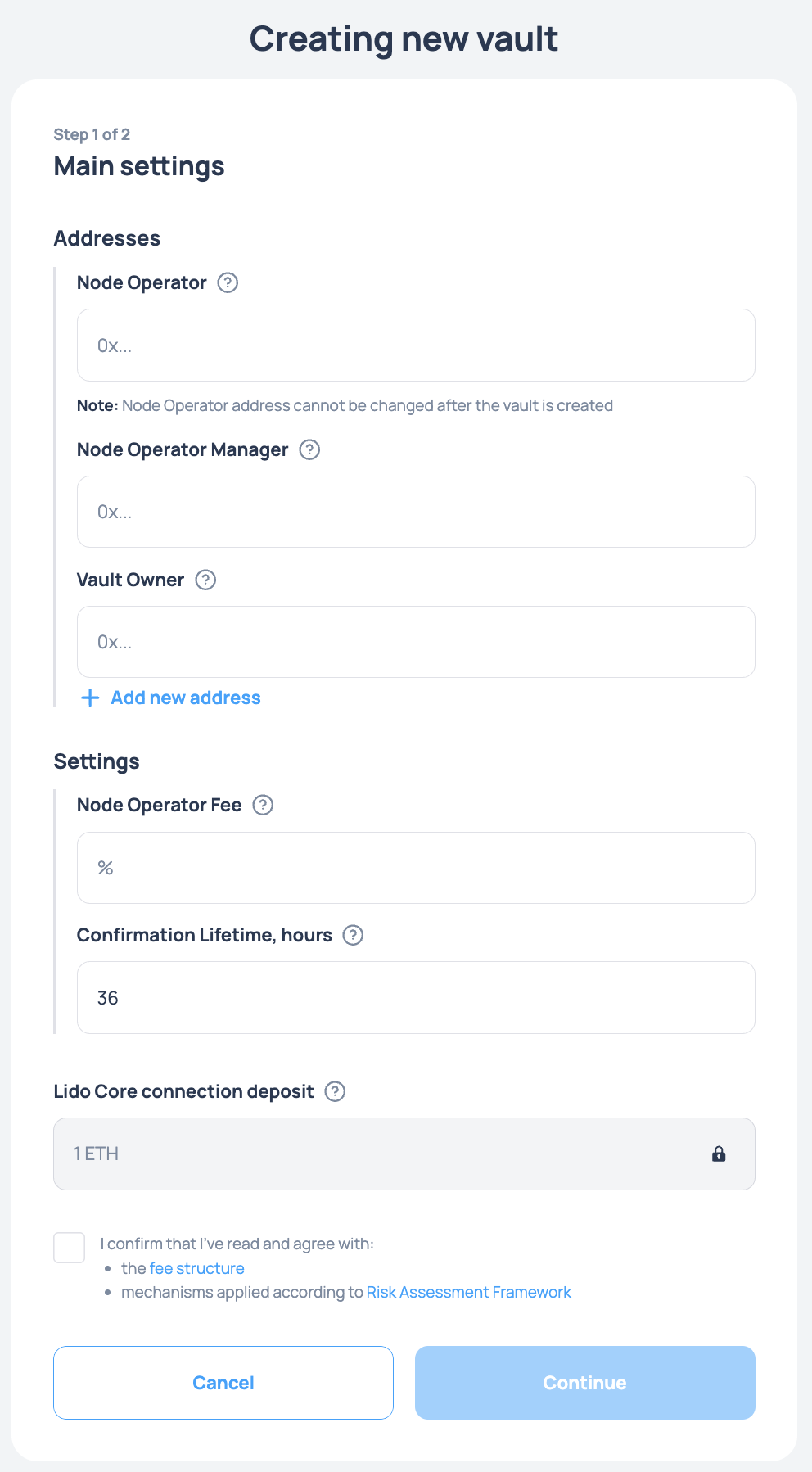
- Fill out the form and click "Continue".
- Sign transaction in the wallet.
by Command-line Interface
yarn start vo w create-vault create --defaultAdmin <VaultOwnerAddress> --nodeOperator <NodeOperatorAddress> --nodeOperatorManager <NodeOperatorManagerAddress> --confirmExpiry <TimeInSeconds> --nodeOperatorFeeRate <NodeOperatorFeeInBasisPoints> 1
using Etherscan UI
- Open Etherscan and navigate to the VaultFactory contract — find its address on the Environments page.
- Call
createVaultWithDashboard:_payableAmount (ether)must be at least 1 ETH.- You can leave
_roleAssignments = [].
- Sign the transaction in your wallet.
- Click View your transaction and wait for it to be executed.
- Open the Logs tab, scroll to the DashboardCreated event, and note down the addresses of the created Vault and Dashboard contracts — these are the key contracts of your newly created stVault.
Adjust stETH minting parameters
By default, a newly created stVault is connected to the Default tier with a Reserve Ratio of 50%. If the Node Operator has passed identification and been granted individual tiers, the stVault can be moved from the Default tier to one of the Node Operator’s tiers to access better stETH minting conditions.
For more information about how this process, please follow Adjust stETH minting parameters.