🏛️ Qualified Custodians Supporting stVaults
This page outlines which Qualified Custodians support interaction with stVaults, and how institutional stakers can access stVaults depending on their custody setup.
This resource is useful for:
- Node Operators offering stVaults to institutional clients
- Institutional clients evaluating custody options
stVaults Technical Requirements
To interact with stVaults, a custodian must support:
- Ethereum mainnet custody
- Arbitrary smart contract interactions
- ERC-20 token custody
- stETH and/or wstETH Ethereum tokens integrated
To interact with the native stVaults Web UI, the custodian must support DeFi connectivity, such as WalletConnect or an equivalent dApp connection method.
Custodian Compatibility Matrix
Support may vary by jurisdiction, entity, and onboarding scope. Clients should confirm details directly with their custodian.
| Custodian | stETH Support | wstETH Support | stVaults Web UI integration | Official website |
|---|---|---|---|---|
| Fireblocks | ✅ | ✅ | Fireblocks DeFi Extension, WalletConnect | https://www.fireblocks.com/ |
| Copper | ✅ | ✅ | CopperConnect | https://copper.co/ |
| Cactus Custody | ✅ | ✅ | Cactus Link | https://www.mycactus.com/ |
| BitGo | ✅ | ✅ | WalletConnect | https://www.bitgo.com/ |
| Anchorage | ✅ | WalletConnect | https://www.anchorage.com/ | |
| Komainu | ✅ | ✅ | WalletConnect | https://komainu.com/ |
| Hex Trust | ✅ | ✅ | WalletConnect | https://www.hextrust.com/ |
Whitelisting smart contract addresses
To use the stVaults infrastructure, the relevant stVaults smart contracts must be whitelisted for interaction. Please ask your administrator or custodian support team to add the required stVaults contract addresses to the whitelist.
Some addresses must be whitelisted before creating your first vault, while vault-specific addresses can only be added after an stVault has been created. We recommend whitelisting the core stVaults infrastructure addresses upfront, and adding individual vault contract addresses as new stVaults are deployed.
stVaults infrastructure addresses to be whitelisted
- Mainnet addresses
- Hoodi Testnet addresses
| Smart Contract | Address | Description |
|---|---|---|
VaultFactory | 0x02Ca7772FF14a9F6c1a08aF385aA96bb1b34175A | Factory for deploying StakingVault + Dashboard pairs using a beacon proxy. Learn more |
VaultHub | 0x1d201BE093d847f6446530Efb0E8Fb426d176709 | Central registry and lifecycle manager for StakingVaults connected to the Lido protocol. Handles vault connection, minting/burning stETH against vault collateral, rebalancing, fee settlement, and bad debt management. Learn more |
PredepositGuarantee | 0xF4bF42c6D6A0E38825785048124DBAD6c9eaaac3 | PredepositGuarantee (PDG) mitigates deposit frontrunning by requiring a node operator guarantee and validator withdrawal credentials proofs (EIP-4788) before activating staged deposits. Learn more |
LazyOracle | 0x5DB427080200c235F2Ae8Cd17A7be87921f7AD6c | Oracle adapter for stVaults. Stores per-vault reports, applies sanity checks, and forwards vault updates to VaultHub. Learn more |
OperatorGrid | 0xC69685E89Cefc327b43B7234AC646451B27c544d | Registry for node operators, groups, and tier parameters that define share limits, reserve ratios, and fee schedules for stVaults. Learn more |
| Smart Contract | Address | Description |
|---|---|---|
VaultFactory | 0x7Ba269a03eeD86f2f54CB04CA3b4b7626636Df4E | Factory for deploying StakingVault + Dashboard pairs using a beacon proxy. Learn more |
VaultHub | 0x4C9fFC325392090F789255b9948Ab1659b797964 | Central registry and lifecycle manager for StakingVaults connected to the Lido protocol. Handles vault connection, minting/burning stETH against vault collateral, rebalancing, fee settlement, and bad debt management. Learn more |
PredepositGuarantee | 0xa5F55f3402beA2B14AE15Dae1b6811457D43581d | PredepositGuarantee (PDG) mitigates deposit frontrunning by requiring a node operator guarantee and validator withdrawal credentials proofs (EIP-4788) before activating staged deposits. Learn more |
LazyOracle | 0xf41491C79C30e8f4862d3F4A5b790171adB8e04A | Oracle adapter for stVaults. Stores per-vault reports, applies sanity checks, and forwards vault updates to VaultHub. Learn more |
OperatorGrid | 0x501e678182bB5dF3f733281521D3f3D1aDe69917 | Registry for node operators, groups, and tier parameters that define share limits, reserve ratios, and fee schedules for stVaults. Learn more |
Deployed stVault addresses to be whitelisted
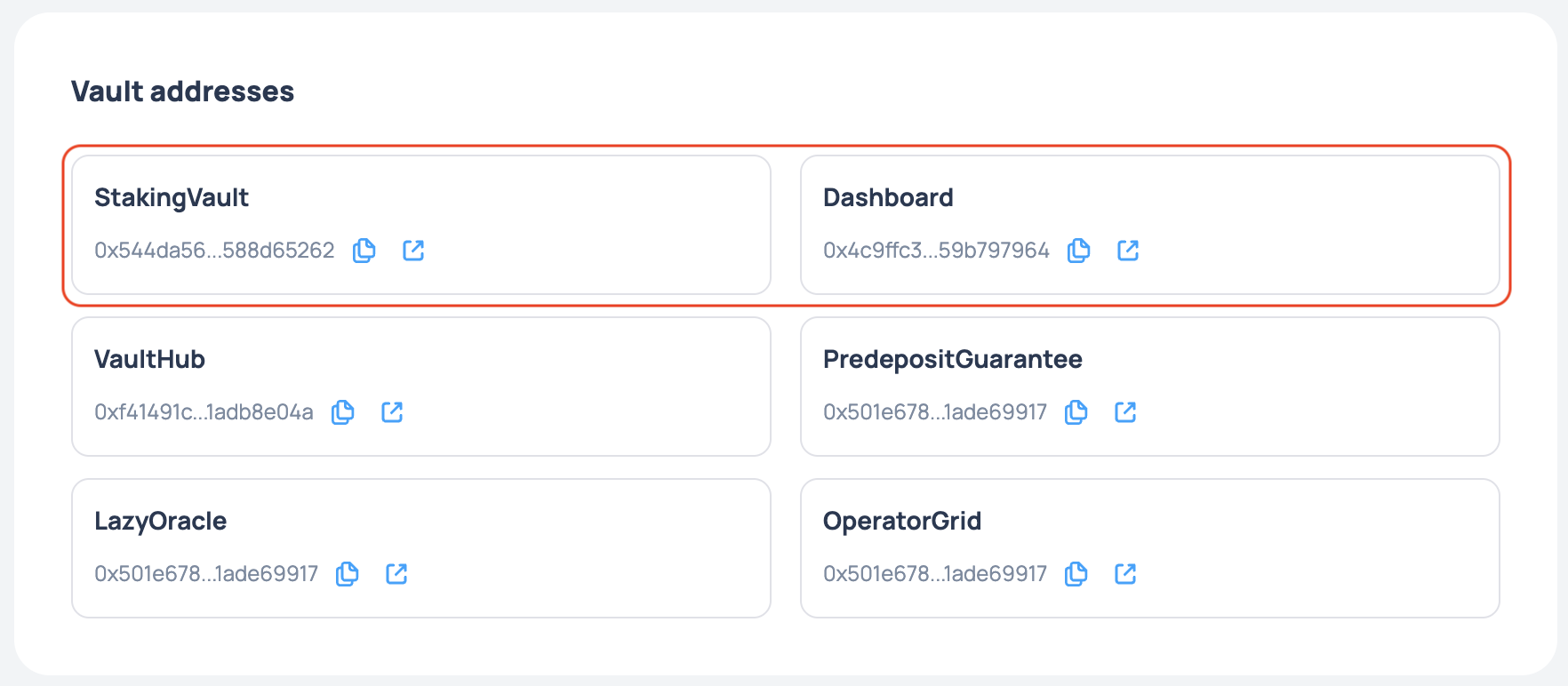
When an stVault is created (deployed), it includes two smart contracts by default: StakingVault (the core primitive) and Dashboard (an interface layer for the StakingVault that simplifies interaction).
You can find the addresses of these smart contracts at the bottom of the stVault main page (Dashboard):