🌊 End-user staking product by DeFi Wrapper
Intro
The DeFi Wrapper is a no-/low-code toolkit that lets builders, Node Operators, and platforms launch customized user-facing staking products powered by stVaults — with optional automated APR-boosting strategies such as leverage loops or any custom stETH-based yield module.
This guide walks through the concepts and practical steps to launch such a product without deep protocol knowledge.
What you can build
DeFi Wrapper supports three product archetypes:
1. Pooled delegated staking
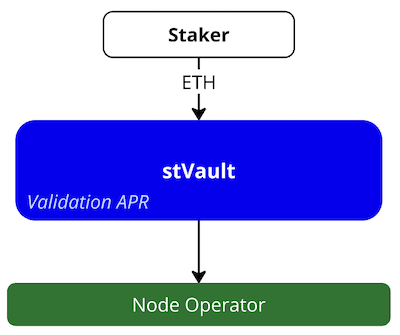
- Users stake ETH with the same Node Operator.
- Users receive APR from validator performance.
Use case: End-user staking product with conservative validation-based APR and a user-friendly interface embedded in your own traffic channel or a partner channel.
2. Pooled delegated liquid staking
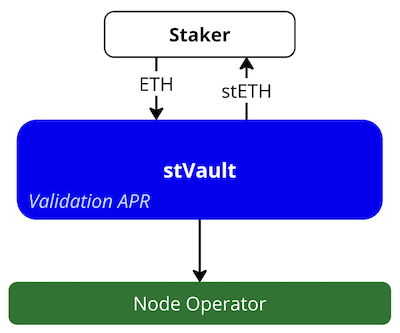
- Users stake ETH with the same Node Operator.
- Users receive stETH (within the stVault’s Reserve Ratio).
- Users receive APR from validator performance.
Use case: Institution-targeted individual (whitelisted) staking product with conservative validation-based APR and liquidity, and a simple user interface hosted on the Node Operator's web server.
3. Pooled delegated staking with boosted APR
3.1. Leveraged staking (looping)
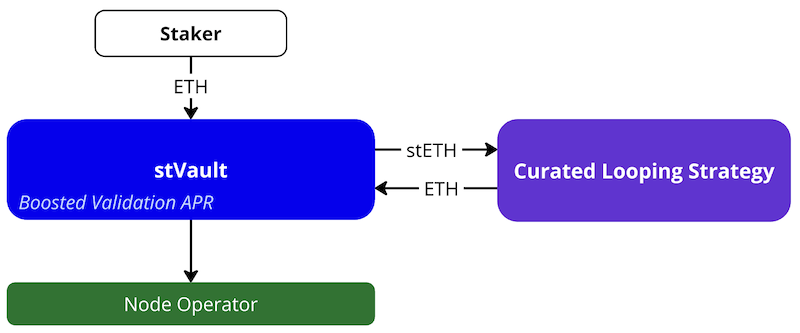
- Users stake ETH with the same Node Operator.
- stETH is minted automatically and deposited into the connected looping strategy (pre-integrated or custom).
- ETH is borrowed against stETH and deposited back into the stVault, increasing the stVault's total value and the amount of ETH on validators.
- Users receive boosted APR from validator performance.
Use case: End-user staking product with higher risk/yield profile through the connected curated looping strategy, increasing the amount of ETH on validators. The product lets the Node Operator attract more ETH for validation than end users deposit.
3.2. DeFi strategy (custom)
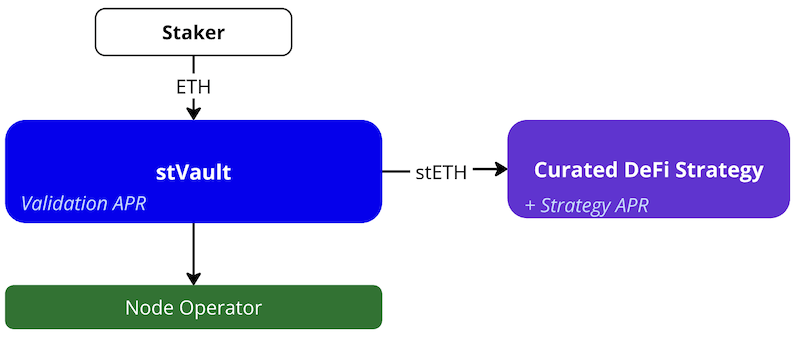
- Users stake ETH with the same Node Operator.
- stETH is minted automatically and deposited into the connected DeFi strategy (leveraged staking or any custom stETH-based module).
- Users receive APR from validator performance + strategy APR.
Use case: End-user staking product with higher risk/yield profile through the connected curated DeFi strategy, making the product more attractive for end users.
Environments
- Testnet
- Mainnet
- DeFi Wrapper Factory (Testnet-9): 0xd05ebf24a340ece8b8fb53a170f1171dcd02b4d9
- Lido Earn Strategy Factory (Testnet): 0x0b860bfFDA72D214Dc8aC98bEcd8D1cd55307561
- Latest branch: vaults-wrapper (develop)
- DeFi Wrapper Factory: 0x3f221b8E5bC098cC6C23611BEeacaeCfD77e1587
- Lido Earn Strategy Factory:0x8Fac09FD82F031D390B94622E2E4baBf16Fd2236
- Latest branch: vaults-wrapper (v1.1.0)
Steps
1. Create a tokenized staking vault (pool)
The easiest way to create a tokenized staking vault (pool) is to use the stVaults CLI.
It's a command-line tool for managing both staking vaults and DeFi Wrapper pools. It deploys a pool plus its underlying staking vault via the Factory contract.
The CLI performs the deployment in two transactions to stay within the current 16M transaction gas limit.
To start:
- Set up the CLI according to the README.
- Prepare a valid CLI configuration — see the configuration tutorial.
The deployer must have at least 1 ETH available. This is the CONNECT_DEPOSIT required to be locked on the vault upon connection to Lido VaultHub.
The newly created staking vault is automatically connected to Lido VaultHub and placed into the default tier. Placement into non-default tiers right upon deployment is not supported.
To list the available pool types and creation commands, run:
yarn start defi-wrapper contracts factory write -h
For each pool type, the CLI prints the environment variables required for the UI setup. Keep this output if you plan to set up the UI.
Deployment of StvPool (pool without stETH minting)
Run yarn start defi-wrapper contracts factory write create-pool-stv -h for the description of the required STV pool parameters.
Start the deployment like:
yarn start defi-wrapper contracts factory w create-pool-stv <DEFI_WRAPPER_FACTORY> \
  --nodeOperator 0x0000000000000000000000000000000000000001 \
  --nodeOperatorManager 0x0000000000000000000000000000000000000002 \
  --nodeOperatorFeeRateBP 10 \
  --confirmExpiry 86400 \
  --minDelaySeconds 3600 \
  --minWithdrawalDelayTime 3600 \
  --name "Debug STV Pool" \
  --symbol STV \
  --proposer 0x0000000000000000000000000000000000000003 \
  --executor 0x0000000000000000000000000000000000000004 \
  --emergencyCommittee 0x0000000000000000000000000000000000000005 \
  --allowList false
Deployment of StvStETHPool (pool with stETH minting)
Run yarn start defi-wrapper contracts factory write create-pool-stv-steth -h for the description of the required STV pool parameters.
Start the deployment like:
yarn start defi-wrapper contracts factory w create-pool-stv-steth <DEFI_WRAPPER_FACTORY> \
  --nodeOperator 0x0000000000000000000000000000000000000001 \
  --nodeOperatorManager 0x0000000000000000000000000000000000000002 \
  --nodeOperatorFeeRateBP 10 \
  --confirmExpiry 86400 \
  --minDelaySeconds 3600 \
  --minWithdrawalDelayTime 3600 \
  --name "Debug STV Pool" \
  --symbol STV \
  --proposer 0x0000000000000000000000000000000000000003 \
  --executor 0x0000000000000000000000000000000000000004 \
  --emergencyCommittee 0x0000000000000000000000000000000000000005 \
  --reserveRatioGapBP 250 \
  --allowList false
The minimum recommended value for reserveRatioGapBP is 250 (2.5%). It is expected to be sufficient to absorb enough of the vault's performance volatility to keep users' positions healthy in most cases.
Deployment of StvStrategyPool with a custom strategy
To deploy a pool integrated with a custom DeFi strategy see the dedicated guide: Pool with a custom strategy. The guide covers both deploying a new pool with a strategy from scratch and upgrading an existing StvStETHPool to a strategy pool.
Deployment of StvStrategyPool with the Lido Earn ETH strategy
The pool with the Lido Earn ETH strategy: ETH is deposited to validators and generates staking rewards, stETH is minted and automatically deposited to the Earn ETH strategy to earn additional rewards. Deposited stETH is distributed across a curated set of high-performing DeFi strategies, including lending markets and LP positions. The Earn ETH strategy is built on Mellow architecture, so the strategy connector is called "MellowStrategy", and the factory is called "MellowStrategyFactory".
To deploy this pool, use the create-strategy-pool-lido-earn-eth. The factory addresses for each network are listed in the Environments section. The full parameter reference is available below.
Start the deployment like:
yarn start defi-wrapper contracts factory w create-strategy-pool-lido-earn-eth <DEFI_WRAPPER_FACTORY> <STRATEGY_FACTORY_ADDRESS> \
  --nodeOperator <NODE_OPERATOR_ADDRESS> \
  --nodeOperatorManager <NODE_OPERATOR_MANAGER_ADDRESS> \
  --nodeOperatorFeeRateBP 10 \
  --confirmExpiry 86400 \
  --minDelaySeconds 3600 \
  --minWithdrawalDelayTime 3600 \
  --name "Staked Earn ETH Pool" \
  --symbol STV \
  --proposer <PROPOSER_ADDRESS> \
  --executor <EXECUTOR_ADDRESS> \
  --emergencyCommittee <EMERGENCY_COMMITTEE_ADDRESS> \
  --reserveRatioGapBP 250
You can use --allowList true to enable the deposit allowlist for this strategy. AllowList Manager role on Strategy must be set separately by TimeLock governance.
AllowList will be always enabled on StvStethPool contract. This allowlist ensures only the strategy contract can deposit into the pool, and minting is required to produce wstETH for the Earn ETH Vault. Strategy contract has its own allow list.
Parameter reference
| Parameter | Description |
|---|---|
<DEFI_WRAPPER_FACTORY> | DeFi Wrapper Factory contract address (see Environments) |
<STRATEGY_FACTORY_ADDRESS> | Lido Earn ETH Strategy Factory contract address (see Environments) |
--nodeOperator | Address of the Node Operator managing validators |
--nodeOperatorManager | Address authorized to manage Node Operator settings |
--nodeOperatorFeeRateBP | Node Operator fee in basis points (10 = 0.1%) |
--confirmExpiry | Confirmation timeout in seconds |
--minDelaySeconds | TimeLock minimum delay before execution |
--minWithdrawalDelayTime | Minimum delay before withdrawals can be finalized |
--name | ERC-20 pool share token name |
--symbol | ERC-20 pool share token symbol |
--proposer | Address authorized to propose TimeLock operations |
--executor | Address authorized to execute TimeLock operations |
--emergencyCommittee | Address that can pause pool operations |
--reserveRatioGapBP | Reserve ratio gap in basis points (recommended min: 250) |
2. Create Web UI
Follow this guide to:
- Clone the provided repository
- Use addresses outputted by CLI to fill up
.env - Adjust titles, logos, texts, and color scheme to your liking
- Deploy the dApp
3. Adjust stETH minting parameters
By default, a newly created stVault is connected to the Default tier with a Reserve Ratio of 50%. If the Node Operator has passed identification and been granted individual tiers, the stVault can be moved from the Default tier to one of the Node Operator’s tiers to access better stETH minting conditions.
For more information about stVault tiers please see Adjust stETH minting parameters.
For pooled vaults the process of changing tier is a bit different because the Vault Owner role is assigned to the Timelock contract. The Timelock contract itself implements a two-step process for performing an on-chain action. First, the holder of its proposer role creates a proposed on-chain action; second, after a time period, the holder of the executor role executes it.
Thus, changing tier for a pooled vault is a three-step process:
- Holder of the Timelock's proposer role calls
TimelockController.scheduleto propose theOperatorGrid.changeTiercall - After the timelock period, the holder of the Timelock's executor role calls
TimelockController.executefor the scheduled proposal - Within the confirmation time window period (default 24 hours), the Node Operator calls
OperatorGrid.changeTierwith the same parameters
Confirming tier change request requires applying fresh report to vault. Read more about applying reports
Parameters needed for this step:
VaultAddress: the address of theVaultcontract.TierID: the ID of the tier to which the stVault will be connected.RequestedShareLimit: the requested absolute stETH minting limit for the stVault, expressed in shares. This value cannot exceed the tier's stETH limit.TimelockAddress: the address of theTimelockControllercontract (deployed together with the pool).OperatorGridAddress: the address of theOperatorGridcontract (available in the stVaults contract addresses list, see #Environments).
How to determine available tier IDs for your Node Operator
To find out which tier IDs are available for your Node Operator, you can use:
CLI:
# Get group information for your Node Operator (shows all available tier IDs)
yarn start contracts operator-grid r group <nodeOperatorAddress>

# Get information about a specific tier
yarn start contracts operator-grid r tier <tierId>
Contract call (Etherscan):
- Navigate to the
OperatorGridcontract address - Go to Contract → Read Contract
- Call
group(nodeOperatorAddress)to get theGroupstruct, which includes thetierIdsarray - Call
tier(tierId)to get details about a specific tier
The group method returns a struct containing:
operator: Node operator addressshareLimit: Maximum liability shares across all group vaultsliabilityShares: Current liability shares in the grouptierIds: Array of tier IDs belonging to this Node Operator
Step 1: Schedule the tier change (Proposer)
CLI
Use --wallet-connect option for all commands or provide private key to CLI .env
- Get address of your timelock contract:
yarn start defi-wrapper use-cases timelock-governance common read get-timelock-address <poolAddress> - Connect wallet that holds the proposer role to CLI
- Propose change tier
yarn start defi-wrapper use-cases timelock-governance dashboard write propose-change-tier <timelockAddress> <dashboard> <tierId> <shareLimit>
Etherscan
- Open Etherscan and navigate to the TimelockController contract by its address.
- Go to the Contract tab → Write Contract.
- Click Connect to Web3 and connect the wallet that holds the proposer role.
- Find the
schedulemethod in the list and fill out the fields:target: theOperatorGridcontract address.value:0(no ETH is sent with this call).data: the ABI-encoded call tochangeTier(address vault, uint256 tierId, uint256 requestedShareLimit). You can generate this using tools like ABI Encoder or cast from Foundry:cast calldata "changeTier(address,uint256,uint256)" <VaultAddress> <TierID> <RequestedShareLimit>predecessor:0x0000000000000000000000000000000000000000000000000000000000000000(no predecessor required).salt:0x0000000000000000000000000000000000000000000000000000000000000000(or any unique value if you need to differentiate identical operations).delay: the delay in seconds (must be at least theminDelaySecondsconfigured during pool deployment).
- Click Write and sign the transaction in your wallet.
- Click View your transaction and wait for it to be executed.
- Note down the operation ID from the
CallScheduledevent in the transaction logs — you will need it to verify the operation status before execution.
Step 2: Execute the scheduled tier change (Executor)
CLI
-
Check the timelock delay period:
# Get timelock address
yarn start defi-wrapper use-cases timelock-governance common read get-timelock-address <poolAddress>

# Then get the minimum delay (replace <timelockAddress> with the address from previous command)
yarn start defi-wrapper use-cases timelock-governance common read get-min-delay <timelockAddress> -
Wait for the timelock delay period to pass. You can verify the operation is ready by calling
yarn start defi-wrapper use-cases timelock-governance common read get-last-operations <timelockAddress> -
Connect wallet that holds the executor role to CLI
-
Execute change tier
yarn start defi-wrapper use-cases timelock-governance dashboard write execute-change-tier <timelockAddress> <dashboard> <tierId> <shareLimit>
Etherscan
-
Check the timelock delay period:
- Open Etherscan and navigate to the TimelockController contract by its address.
- Go to the Contract tab → Read Contract.
- Find the
getMinDelaymethod and click Query to see the minimum delay in seconds.
-
Wait for the timelock delay period to pass. You can verify the operation is ready by calling
isOperationReady(operationId)on the TimelockController contract (in Read Contract tab). -
Execute change tier, connect the wallet:
- Open Etherscan and navigate to the TimelockController contract by its address.
- Go to the Contract tab → Write Contract.
- Click Connect to Web3 and connect the wallet that holds the executor role.Click Connect to Web3 and connect the wallet that holds the executor role.
-
Find the
executemethod in the list and fill out the fields with the same values used in theschedulecall:target: theOperatorGridcontract address.value:0.payload: the same ABI-encoded call data used in step 1.predecessor:0x0000000000000000000000000000000000000000000000000000000000000000.salt: the same salt value used in step 1.
-
Click Write and sign the transaction in your wallet.
-
Click View your transaction and wait for it to be executed.
Step 3: Confirm the tier change (Node Operator)
Within the confirmation time window period (default 24 hours) after step 2, the Node Operator must confirm the tier change:
stVaults UI
- Go to
https://stvaults.lido.fi/vaults/[vaultAddress]/settings/tier - Connect wallet that has Node operator address
- Follow UI to confirm tier change
CLI
- Connect wallet that has Node operator address to CLI
yarn start vo w change-tier-by-no -v <vaultAddress> -r <requestedShareLimit> <tierId>
Etherscan
- Open Etherscan and navigate to the OperatorGrid contract by its address (available in the stVaults contract addresses list, see #Environments).
- Since this contract is a proxy, complete the verification steps once (if not done before):
- Go to Contract → Code.
- Click More options.
- Select Is this a proxy?.
- Click Verify in the dialog.
- Return to the contract details page.
- Open the Contract tab → Write as Proxy.
- Click Connect to Web3 and connect the wallet registered as the Node Operator.
- Find the
changeTiermethod in the list and fill out the fields with the same values used in steps 1 and 2:vault: theVaultcontract address.tierId: the tier ID.requestedShareLimit: the requested share limit.
- Click Write and sign the transaction in your wallet.
- Click View your transaction and wait for it to be executed.
4. Deposit ETH to validators
Supplying ETH to the stVault increases its balance. The Node Operator can then deposit ETH from this balance into validators.
The Predeposit Guarantee (PDG) contract, as part of the stVaults platform, helps prevent deposit frontrunning caused by the vulnerabilities described in LIP-5. PDG secures the Vault Owner’s ETH deposits to validators from being front-run by the Node Operator.
One of the key benefits of using PDG is the avoidance of commingling: it keeps the finances of the Vault Owner and the Node Operator strictly separated.
PDG enables three main use cases:
- Full-cycle proof of validators. Enables a non-custodial deposit mechanism by using guarantee ETH as collateral. Follow the main guide.
- PDG shortcut. Allows skipping the pre-deposit steps and depositing directly to a validator without using PDG initially. The validator can later be associated with the vault by proving it through PDG. This path is applicable when there is unconditional trust between the Node Operator and the Vault Owner. Follow the shortcut guide.
- Adding existing validators. Lets you connect an existing validator from external staking infrastructure to an stVault as an advanced integration use case. Consolidations guide
Read more: Technical details; GitHub Repository.
5. Monitor stVault health and rebalance
The key stVault metrics that the Vault Owner should monitor and control are:
- Utilization ratio — the share of the stETH minting capacity currently used by the Vault Owner. Learn more
- Health Factor — a metric that reflects the economic state of the vault. It shows how the stETH liability is collateralized by the Total Value. A Health Factor of 100% corresponds to the Forced Rebalance Threshold, meaning that if the Health Factor falls below 100%, the stVault becomes subject to forced rebalancing. Learn more
Read more:
The Health Factor metric may decrease as a result of validator underperformance, penalties, or a slashing event.
If this happens, there are three main options available:
- Supply ETH to increase Total Value.
- Repay stETH to reduce stETH liability.
- Rebalance ETH (optionally combined with a supply in a single transaction).
Rebalancing involves transferring available ETH from the stVault balance to Lido Core, receiving stETH at a 1:1 ratio, and repaying it back to the stVault. This reduces stETH liability and thereby increases the Health Factor.
Rebalancing is performed in one transaction.
The amount of ETH required for rebalancing to bring the Utilization Ratio to 100% depends on the current Health Factor and Reserve Ratio. It can be pre-calculated manually using the formula, or via the built-in methods.
by Formula
ETH for rebalance = (stETH Liability − (1 − Reserve Ratio) × Total Value) / Reserve Ratio
by Command-line Interface
See the CLI documentation for rebalance commands.
using Etherscan UI
- Open Etherscan and navigate to the VaultHub contract by its address (available in the stVaults contract addresses list, see #Environments).
- Since this contract is a proxy, complete the verification steps once (if not done before):
- Go to Contract → Code.
- Click More options.
- Select Is this a proxy?.
- Click Verify in the dialog.
- Return to the contract details page.
- Open the Contract tab → Read as Proxy.
- Click Connect to Web3 and connect your wallet in the dialog window.
- Find the method
healthShortfallSharesin the list, fill out the input with thevaultcontract address, and click Query. - Receive the result right under the submit button.
DeFi Wrapper roles and permissions
For DeFi Wrapper-specific roles (Pool, Withdrawal Queue, Distributor, Strategy, Timelock), see DeFi Wrapper roles and permissions.
For operating withdrawals (queue monitoring, liquidity, finalization), see Withdrawals operations.
For stVaults roles (Vault/Dashboard/PDG), see stVaults Roles and permissions.