Solana manual withdrawal with CLI
1. Environment Setup
We've prepared a CLI in Solido to simplify your workflow. You'll need to:
- Install Rust: Follow the instructions at Rust Installation.
curl --proto '=https' --tlsv1.2 -sSf https://sh.rustup.rs | sh
source "$HOME/.cargo/env"
rustup override set 1.60.0
- Install Solana CLI v1.13.7: Visit Solana CLI Installation.
sh -c "$(curl -sSfL https://release.solana.com/v1.13.7/install)"
export PATH="$HOME/.local/share/solana/install/active_release/bin:$PATH"
- Install Solido CLI v2.1.0 from the official GitHub repository: See Solido Releases.
git clone --recurse-submodules -b V2.1 https://github.com/lidofinance/solido solido_v2
cd solido_v2
cargo build --release
If the build fails due to a broken submodule in the anchor-lang dependency, you need to create a fork with the fix:
git clone -b solana-1.9.28 https://github.com/AnchorLang/anchor-solana1.9.28.git
cd anchor-solana1.9.28

git submodule deinit -f examples/cfo/deps/stake || true
git rm -f examples/cfo/deps/stake || true
rm -rf .git/modules/examples/cfo/deps/stake || true

git commit -m "Remove broken stake submodule"
git remote set-url origin https://github.com/YOUR_GITHUB_USERNAME/anchor-solana1.9.28.git
git push origin solana-1.9.28
Then update Cargo.toml in the solido_v2 directory, replacing the anchor-lang dependency with your fork:
anchor-lang = { git = "https://github.com/YOUR_GITHUB_USERNAME/anchor-solana1.9.28", branch = "solana-1.9.28" }
After that, re-run cargo build --release.
2. Transfer stSOL to Local Account
⚠️ Note: Our CLI can only work with local keys. Consider using a new account for withdrawals to keep your main wallet secure. The withdrawal operation will utilize the following:
SOL_ACCOUNT_PUBKEY: Public key of the local Solana account.STSOL_ACCOUNT_PUBKEY: Public key of the child stSOL account fromSOL_ACCOUNT_PUBKEY.KEYPAIR_FILE: Local file containing the keypair fromSOL_ACCOUNT_PUBKEY.STAKE_ACCOUNT_PUBKEY: Public key of the child stake account fromSOL_ACCOUNT_PUBKEY.
- Create a new local account:
solana-keygen new --outfile ./local-keypair.json
Remember the KEYPAIR_FILE path and SOL_ACCOUNT_PUBKEY from the output.
- Configure RPC endpoint:
The default Solana RPC endpoint may not work reliably for mainnet operations. Set a dedicated RPC URL (e.g., from Helius):
solana config set --url https://mainnet.helius-rpc.com/?api-key=YOUR_API_KEY
- Verify the new account with
SOL_ACCOUNT_PUBKEY:
solana balance SOL_ACCOUNT_PUBKEY
-
Transfer stSOL to the local account using
SOL_ACCOUNT_PUBKEYand note the transaction signature. -
Identify
STSOL_ACCOUNT_PUBKEY:
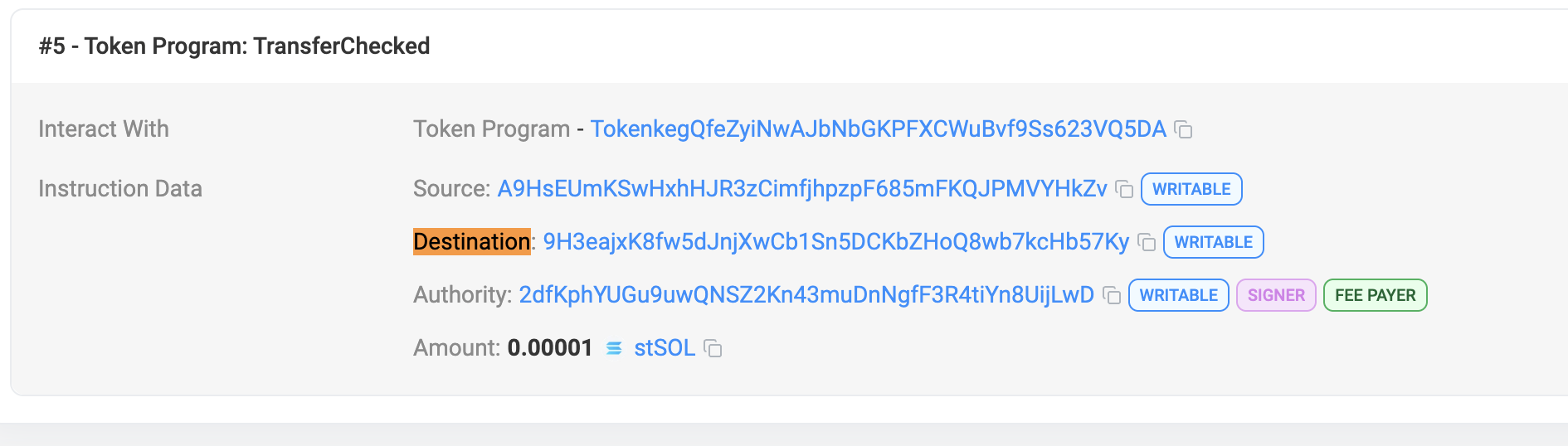
⚠️ After transferring stSOL, a child account for stSOL is created under your local account. To proceed, locate this address by searching your transaction signature on Solscan and saving the Destination pubkey found under Token Program: TransferChecked in the instruction details.
3. Withdraw stSOL
- Execute the withdrawal to your stake account:
./target/release/solido --config ./solido_config.json --keypair-path KEYPAIR_FILE withdraw --amount-st-sol STSOL_AMOUNT
⚠️ Note: If you're seeing the following error:
Program log: The exchange rate is outdated, it was last computed in epoch 644, but now it is epoch 646.
Execute the following command to update the exchange rate:
./target/release/solido --config ./solido_config.json --keypair-path KEYPAIR_FILE perform-maintenance
If you get an RPC response error, such as -32002, simply re-run the command.
Once the exchange rate is updated, you should get a message "Updated exchange rate", and you can proceed to re-run the withdrawal command.
-
Record the
STAKE_ACCOUNT_PUBKEYfor further steps. -
Deactivate the stake account:
solana deactivate-stake STAKE_ACCOUNT_PUBKEY --keypair KEYPAIR_FILE
⚠️ Wait for the epoch to end (~1-2 days) for the stake account to become inactive. Check the epoch status on Solana Explorer.
4. Transfer SOL to Main Account
After the epoch ends, withdraw SOL from STAKE_ACCOUNT_PUBKEY to your main account, referred to as MAIN_ACCOUNT_PUBKEY.
solana withdraw-stake **STAKE_ACCOUNT_PUBKEY** \
**MAIN_ACCOUNT_PUBKEY** SOL_AMOUNT \
--keypair **KEYPAIR_FILE**